How to Make a Film or Drama from a Script with AI in HFLUX

The short answer: upload a script to the STORY tab, break it into shots in SCENE
To turn a finished screenplay into video with AI, upload the script file to the STORY tab in HFLUX, send the scenes you want to work on to the SCENE tab, and break each scene into shots there
From the per-SHOT production board you generate the first and last frames for every shot, then the video, and audio, editing and upscaling continue in the same account
HFLUX runs in a browser with nothing to install
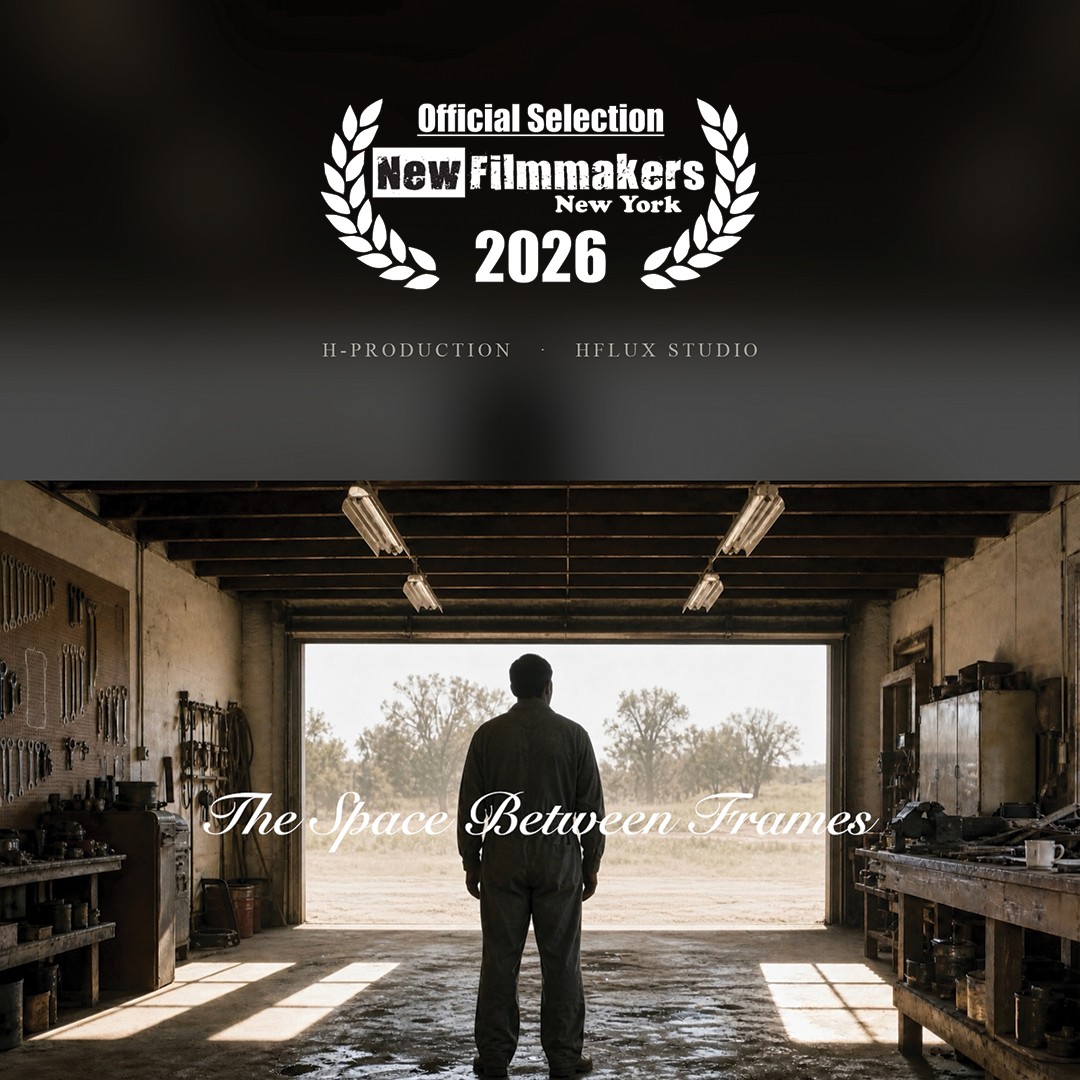
A film made in HFLUX is a NewFilmmakers New York 2026 Official Selection
The Space Between Frames, made by H-PRODUCTION and HFLUX STUDIO, is an Official Selection at NewFilmmakers New York 2026
The laurel on the poster reads Official Selection · NewFilmmakers New York · 2026, and the selection notice from the festival opened with a single line, Congratulations!
This is an official selection rather than an award
The film was made entirely inside HFLUX
H-PRODUCTION is a video production company in Gangnam, Seoul, and its official site lists feature film and commercial work
The NewFilmmakers series began in 1998 and its official site describes itself as New York's only bicoastal year round film festival
It has screened at Anthology Film Archives (32 Second Avenue) in Manhattan, and the site states that online audiences grew well beyond theatre audiences during the period the theatre was closed and kept growing, with NewFilmmakers Plus reaching overseas viewers
The notice says the screening schedule will be announced separately once the festival confirms it, and that festival titles are now viewable at any time for one month through the online screening route NewFilmmakers Plus
Does the AI rewrite a locked screenplay?
No
The SCENE tab keeps dialogue, action lines and scenes as written and divides them into video shots
It does not rewrite, summarise or adapt the content; it adds shooting information such as shot size and lighting
Because of that, the resulting shots can be checked against the script line by line
The official guidance gives the reason for this design: a screenplay is already a locked result after many revisions, so a tool that quietly reshapes sentences forces the review to start over
The SCENE screen keeps the original slug lines and logline in place, and the cast card, reference material and location are gathered on one screen
How are the same character and the same place kept across scenes?
A feature has dozens of scenes, the same character appears in many of them and the same room comes back repeatedly
If a face changes from scene to scene or one space looks different each time, the pieces cannot be joined, and HFLUX is built to handle this from the script stage
From the cast card you generate a character sheet first, or load a sheet you prepared, and that sheet carries into the first and last frames of the following shots so the same character is maintained
Photos of people, locations and props go in as reference photos
Do I have to start in the STORY tab?
For a short piece you can start directly at the SCENE stage
The STORY tab is the step for features with many scenes, where you set the order and track how far the work has progressed
Script files upload as txt, pdf or docx and are split automatically into scenes, listed as scene cards
To move a scene forward, press Work in SCENE on the scene card, or check several scenes and use Send to SCENE
Does video come out without an image step?
No
On the per-SHOT production board the order is first frame, last frame, confirm, then video, one shot at a time
Because the images come first, the overall flow can be reviewed before any video is made, and the same moment can be generated again at a different resolution or with a different model
Shot length is set per shot, up to 30 seconds for one shot and 15 seconds on Seedance 2.0 models
For shots with dialogue, set the video model on the production board to Seedance 2.5 or a Seedance 2.0 model and turn sound on, and the shot is generated with lip movement matched to the line
Korean is supported
The full workflow, step by step
One, upload the script file (txt, pdf or docx) to the STORY tab and receive the scene card list
Two, press Work in SCENE on a scene card, or Send to SCENE for several at once
Three, run SHOT Breakdown in the SCENE tab with the text preserved as written
Four, create the character sheet from the cast card and add people, locations and props as reference photos
Five, generate and confirm the first and last frames on the per-SHOT production board, then make the video
Six, create voice, sound effects and music in the Audio tab, then cut and join video and sound on the timeline in the Edit tab and export MP4
The Edit tab also has transitions, colour correction, playback speed, an audio track mixer and subtitles
Seven, raise the final video to 1080p, 2K or 4K in the Upscale tab
Where this workflow is used
The official use cases are short and feature films that turn a finished screenplay into video scene by scene, previsualization before a shoot, web dramas and series produced episode by episode, storyboards and shot lists, pitch pieces that show tone and flow before investment or commissioning, and narrative music videos and commercials that have a script
Start by uploading one episode script or one screenplay you already have
HFLUX opens straight in a browser at hflux.co.kr
For film, drama and commercial AI video production enquiries, use the in-service contact form, help@h-international.co.kr or 070-8869-3409


댓글
댓글 쓰기